Novel planning and outlining software
Plan a novel from the first idea to the last scene. Outline every part, chapter and scene, rearrange them on a corkboard, and keep the story's timeline and maps beside the words.
AuthorOS Write
Give every idea somewhere to belong. A story grows through its characters, places, plotlines, timelines and themes. Develop It brings those parts into one project workspace, so you can build them out and see how they fit together.
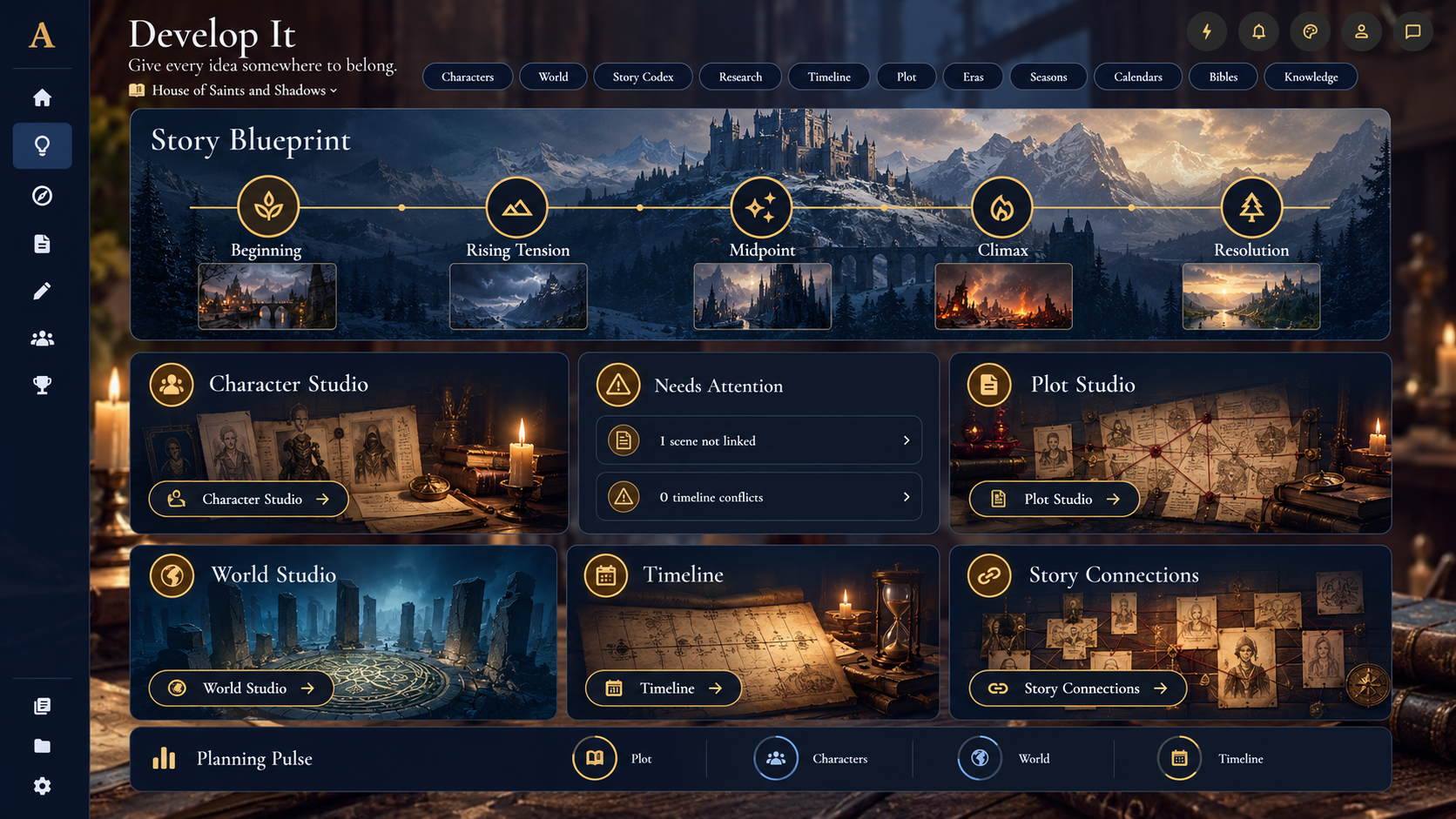
Start with the shape of the story. Open a specialist studio when you want to work on a particular element, then return to the overview to see what you’ve developed and what may need attention.
Use Story Blueprint to map the major stages of your story: Beginning, Rising Tension, Midpoint, Climax and Resolution. Get a quick view of what you’ve mapped and open the blueprint to develop it further.
Open the area you need, from Character Studio and Plot Studio to World Studio, Story Codex, Research and Timeline. Develop characters, locations, plot structure, story knowledge and events within the same project.
Other planning areas include eras, seasons, calendars, bibles, themes and knowledge, giving you room to develop the systems your story needs.
Develop It highlights items that may need a second look, such as a scene that isn’t linked, a character missing a goal or a timeline conflict.
Use these prompts to review your planning and keep important story details from becoming disconnected.
Story Connections helps you see how story records link together. Connect characters, places and plot points, then explore the relationships between them as your project grows.
Planning Pulse gives you a view across areas such as plot, characters, world, timeline and themes. See where you’ve made progress and where you may want to spend time next.
Move between story structure, characters, worldbuilding, research and timeline planning without losing sight of the whole project.
Give every idea somewhere to belong.
Plan a novel from the first idea to the last scene. Outline every part, chapter and scene, rearrange them on a corkboard, and keep the story's timeline and maps beside the words.
Build the places, peoples and rules of your story in one story bible. Every location, faction, item and piece of lore is a record you can link to the scenes where it matters.
Give every character a full record: roles, templates, your own fields, and the scenes they appear in. Keep the details consistent from the first chapter to the last.
Write your story, one scene at a time. Your manuscript is more than a long document. It’s chapters, scenes, decisions and details that need to stay connected as the story grows.
Catch the spark. See where it leads. Sketch It gives you room to catch the beginnings of a story and explore them, then arrange chapters and scenes and map the connections across your story, all within the project you are building.
See your progress. Find your next step. Your story has many moving parts. The AuthorOS Dashboard brings your writing activity, current goals and project milestones into one clear view, so you can see how things are progressing and pick up where you left off.